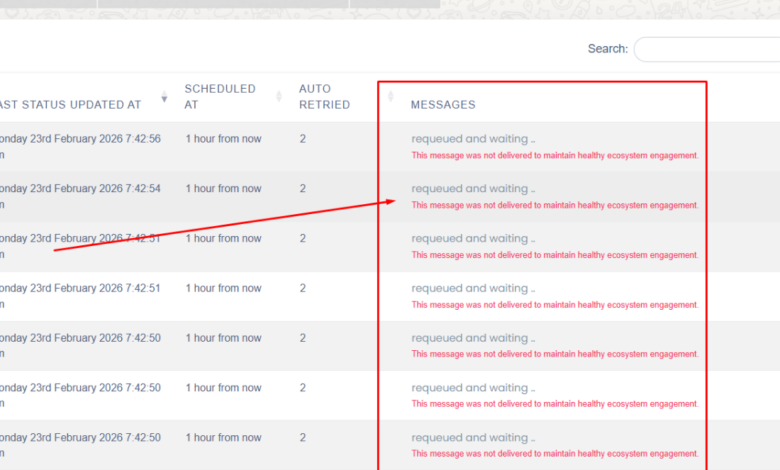
This message was not delivered to maintain healthy ecosystem engagement: WhatsApp Business API Error

If you’re running bulk campaigns using WhatsApp Business API, there’s a good chance you’ve encountered this message:
“This message was not delivered to maintain healthy ecosystem engagement.”
For many businesses, this feels confusing. The API is working, templates are approved, and yet messages aren’t delivered. It can feel like something is broken — but actually, this isn’t a technical error at all.
This message comes directly from WhatsApp’s system and is meant to protect users from unwanted or low-quality messaging. Understanding why it appears — and how to prevent it — is essential if you want reliable WhatsApp campaign delivery.
Let’s explain this in simple terms.
What This WhatsApp Message Really Means
When WhatsApp shows this message, it means the platform intentionally stopped your message from being delivered. The system believes that sending the message may reduce engagement quality or resemble spam behavior.
WhatsApp is built as a personal messaging platform, not a traditional marketing channel. Because of this, Meta uses engagement-based safeguards. If your account activity signals that recipients might not respond positively, the platform limits delivery automatically.
This doesn’t mean your account is banned. It simply means WhatsApp is protecting its ecosystem by restricting certain messages.
Why This Happens During Bulk Marketing Campaigns
This issue most commonly appears when businesses start sending bulk marketing campaigns through the API. From WhatsApp’s perspective, sudden large-volume messaging — especially from a new or low-reputation number – can look risky.
If the system detects that recipients may ignore the messages, block the sender, or report spam, it reduces delivery before those negative actions happen.
In simple words, WhatsApp tries to prevent problems before they occur.
Common Reasons Behind This Error
Unverified Facebook Business Manager
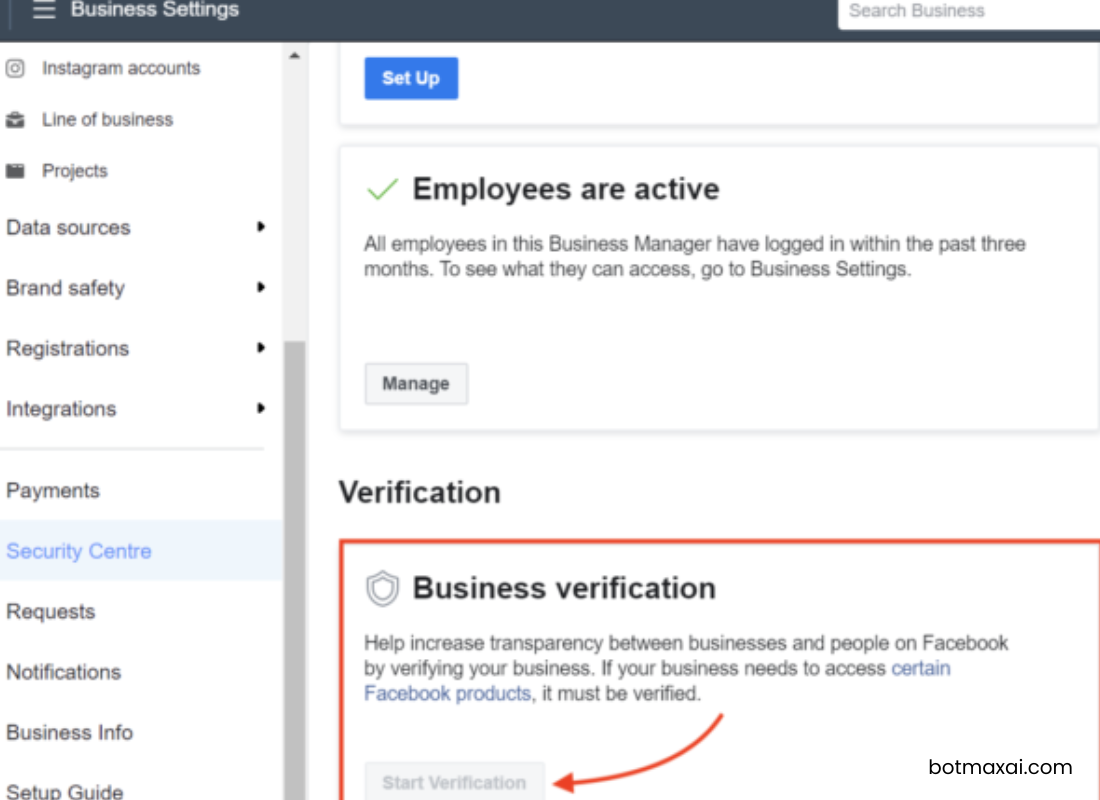
One of the biggest trust signals for WhatsApp is whether your Meta Business account is verified. When your Business Manager isn’t verified, WhatsApp has less confidence that your organization is legitimate and established.
While verification isn’t always mandatory to start, unverified businesses often face stricter delivery behavior, especially during bulk campaigns. Verification helps establish identity and improves trust, which supports smoother message delivery.
New WhatsApp API Number Without Reputation
Every WhatsApp API number starts with zero reputation. The platform doesn’t yet know whether your messages will be helpful or unwanted.
If a new account immediately starts sending large promotional campaigns, it raises red flags. WhatsApp prefers that businesses first build conversational history and engagement before scaling marketing messages.
Think of it like launching a new email domain — you wouldn’t send 50,000 emails on day one.
Starting Directly With Marketing Messages
Another common mistake is jumping straight into promotions.
WhatsApp expects businesses to first send utility or transactional messages, such as:
- order confirmations
- appointment reminders
- OTPs
- delivery updates
- support replies
These messages help establish normal communication patterns. If your first activity is purely promotional, the system may interpret it as aggressive marketing and limit delivery.
Spam-Like Sending Behavior
Sometimes businesses unintentionally trigger restrictions simply because of how they send messages.
Sending thousands of identical promotional texts in a short time, messaging users repeatedly without response, or running frequent campaigns to inactive contacts can look like spam from WhatsApp’s perspective.
The algorithm doesn’t judge intention — only behavior patterns.
Using Cold or Non-Opt-In Contact Lists
Perhaps the most important factor is your contact list quality.
If you message users who never:
- opted in
- interacted with your brand
- or gave permission to receive updates
they are far more likely to ignore or report the message.
Even a small number of blocks or spam reports can reduce your account’s quality rating. Once quality drops, WhatsApp automatically becomes stricter about message delivery.
This is why WhatsApp strongly emphasizes opt-in based communication.
How to Fix and Prevent This Problem
Verify Your Business Manager
Completing Meta Business verification is one of the most effective steps you can take. Verification strengthens your trust level in WhatsApp’s system and supports long-term scaling of messaging activity.
For any business planning serious automation or bulk campaigns, this step should be treated as foundational rather than optional.
Warm Up New Accounts Properly
If your WhatsApp API number is new, avoid sending large marketing campaigns immediately.
Start by sending useful, expected messages to real customers. Encourage replies, answer queries, and build genuine conversations. This helps WhatsApp recognize your account as a legitimate communication channel.
Once engagement history develops, marketing messages are far more likely to be delivered successfully.
Increase Messaging Volume Gradually
Instead of blasting your entire database at once, increase campaign size slowly.
Begin with your most active users — those who recently interacted, purchased, or contacted your business. Positive engagement from this group sends strong signals to WhatsApp that your messages are relevant.
As your reputation improves, the system naturally allows broader reach.
Maintain Responsible Messaging Practices
WhatsApp works best when messages feel helpful rather than intrusive.
Avoid sending repeated promotional messages to inactive users. Keep campaign frequency reasonable, ensure your content matches customer expectations, and avoid overly aggressive sales language.
Treat WhatsApp like a conversation channel, not a mass advertising platform.
Use Only Real, Verified Contact Lists
The safest and most sustainable strategy is to message only users who clearly opted in.
This might include people who:
- filled a website form
- subscribed for updates
- contacted your support team
- purchased from your business
- joined via QR code or WhatsApp button
Clean lists with real consent dramatically improve delivery rates and account reputation.
Final Thoughts
“This message was not delivered to maintain healthy ecosystem engagement” isn’t a bug or API failure. It’s WhatsApp’s way of ensuring that users receive meaningful, relevant communication.
For businesses, the solution isn’t technical — it’s strategic.
Focus on building trust first:
- verify your Business Manager
- warm up new accounts with real conversations
- grow messaging volume gradually
- avoid spam-like behavior
- and always use genuine opted-in contact lists
When you follow these practices, this error becomes rare, and WhatsApp transforms into one of the most powerful and reliable communication channels for customer engagement and marketing.