If you’re planning to use WhatsApp Business API, one of the first things you’ll hear is:
👉 “You need Facebook (Meta) Business Manager verification.”
But what does that actually mean?
Is it mandatory?
Does it really increase sending limits and trust?
Let’s break it down in a simple, practical way — so you understand why verification matters, when it’s required, and exactly how to complete it step-by-step.
What is Facebook Business Manager Verification?
Facebook Business Manager (now part of Meta Business Suite) verification is a process where Meta confirms that your business is real, legitimate, and legally registered.
During this process, Meta checks:
- Your legal business name and address
- Business phone/email
- Website ownership
- Official business documents
The goal is simple: ensure that only genuine businesses use Meta’s advertising tools and WhatsApp Business API.
Verification basically acts as your digital business identity approval inside Meta’s ecosystem.
Meta describes business verification as a way to confirm legitimacy, increase credibility, and unlock advanced features across platforms including WhatsApp.
Is Facebook Business Verification Required for WhatsApp Business API?
Here’s the honest answer:
✔️ Technically — not always mandatory today
Since late 2023, Meta allows businesses to start using WhatsApp API without immediate verification, and messaging limits can grow based on quality and engagement.
✔️ Practically — still strongly recommended
Even if optional at the start, verification becomes important because it:
- Helps unlock higher messaging tiers
- Enables Official Business Account (green tick eligibility)
- Builds customer trust
- Allows scaling with multiple numbers or features
Some systems also require verification for full API access or advanced capabilities, especially at scale.
So in real business use:
👉 If you want serious WhatsApp automation, campaigns, and growth — verification is almost unavoidable.
Why Facebook Business Manager Verification Matters for WhatsApp API
Let’s talk about the real benefits — not just theory.
1️⃣ Builds Trust With Customers
When your business is verified:
- Customers feel safer interacting with you
- It reduces impersonation risks
- Helps your brand appear authentic
WhatsApp itself confirms that verified accounts help users know they’re chatting with the real business.
In simple terms:
Verification = credibility + professionalism.
2️⃣ Helps Increase Messaging Limits
WhatsApp API uses tier-based messaging limits.
New businesses usually start small.
As your account gains:
- good quality rating
- customer engagement
- verified status
Meta gradually increases your allowed messaging volume.
Verification historically helped businesses move beyond early limits like 250 or 1000 conversations/day, supporting higher scale communication.
Even today, verification improves trust signals that support long-term scaling.
3️⃣ Unlocks Advanced WhatsApp Features
Verification may be required for:
- Official Business Account (green tick eligibility)
- Higher account tiers
- Multiple phone numbers
- Advanced API integrations
Verified businesses get broader operational capabilities and stronger control over their brand identity inside Meta’s ecosystem.
4️⃣ Required for Serious Automation or SaaS Integration
If you’re building:
- CRM integrations
- WhatsApp chatbot automation
- bulk campaign systems
- SaaS tools like your BotMax AI ecosystem
then verification becomes essential to avoid restrictions and ensure stable API access.
Documents Required for Facebook Business Verification
Before starting, keep these ready:
✔ Legal business document (any one)
- GST certificate (India)
- Certificate of incorporation
- Business license
- Bank statement
- Shop establishment certificate
- PAN or utility bill
These must clearly show:
- legal business name
- official address
Meta requires documents proving the business exists and matches the provided details.
✔ Website requirements
Your website should:
- be live (HTTPS preferred)
- mention legal business name
- include contact info
✔ Business email or phone
You must verify ownership using:
- domain email
- SMS
- phone call
- domain verification
Step-by-Step: How to Verify Facebook Business Manager
Here’s the practical walkthrough.
Step 1: Open Meta Business Settings
Go to:
👉 business.facebook.com
Login and select your Business Manager.
Step 2: Complete Business Info First
Fill:
- Legal name
- Address
- Phone
- Website
Make sure details match documents exactly — mismatches are the #1 rejection reason.
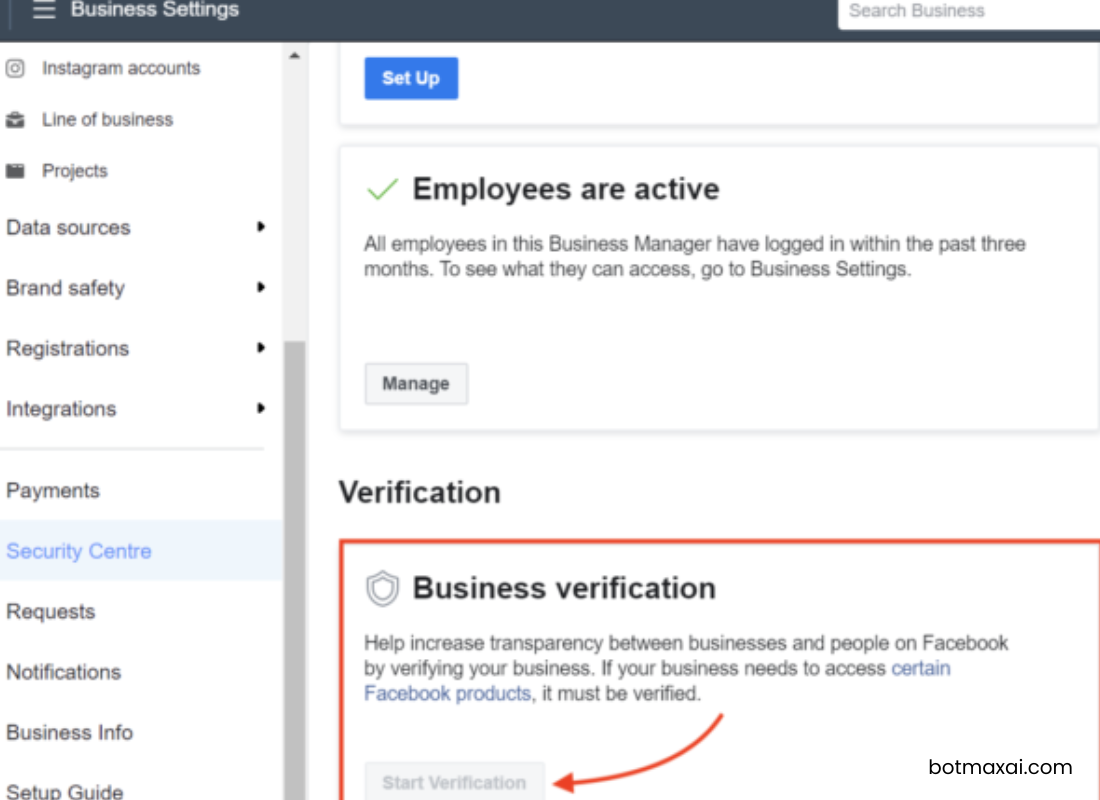
Step 3: Go to Security Center
Navigate:
Settings → Security Center → Business Verification
Click Start Verification.
Step 4: Enter Organization Details
You’ll be asked for:
- country
- legal business info
- contact number
- website
Ensure everything matches official records.
Step 5: Choose Verification Method
Meta may verify via:
- SMS
- phone call
- domain verification
Pick whichever matches your business documentation.
Step 6: Upload Business Documents
Upload clear copies showing:
- business name
- address
- authority proof
For Indian businesses, GST certificate is commonly used.
Step 7: Submit & Wait
After submission:
- approval can take minutes to 14 days
- Meta may request additional info
You’ll receive status updates in Business Manager.
Common Reasons Verification Gets Rejected
Most businesses fail verification due to simple issues:
- business name mismatch between website and documents
- blurry or incomplete documents
- website missing legal name
- using personal email instead of domain email
Fix these, and reapply.
Pro Tips (From Real WhatsApp API Experience)
If you want fast approval:
✔ Use exact legal name everywhere
✔ Add company name in website footer
✔ Use domain email (not Gmail/Yahoo)
✔ Ensure phone number works for OTP
✔ Upload colored, full-document scans
These small things dramatically increase approval success.
Final Thoughts
Facebook Business Manager verification isn’t just a technical checkbox.
It’s your official identity approval inside Meta’s ecosystem.
While you might start WhatsApp API without it, verification:
- builds trust
- supports higher messaging scale
- unlocks advanced features
- strengthens brand credibility
For any serious business using WhatsApp automation or marketing, it’s not optional — it’s a growth requirement.
If you’re planning to scale customer communication, run campaigns, or build automation tools, completing verification early saves time, avoids restrictions, and ensures smooth expansion.